Training on the Mac GPU from Kubeflow Pipelines with KubeSilicon
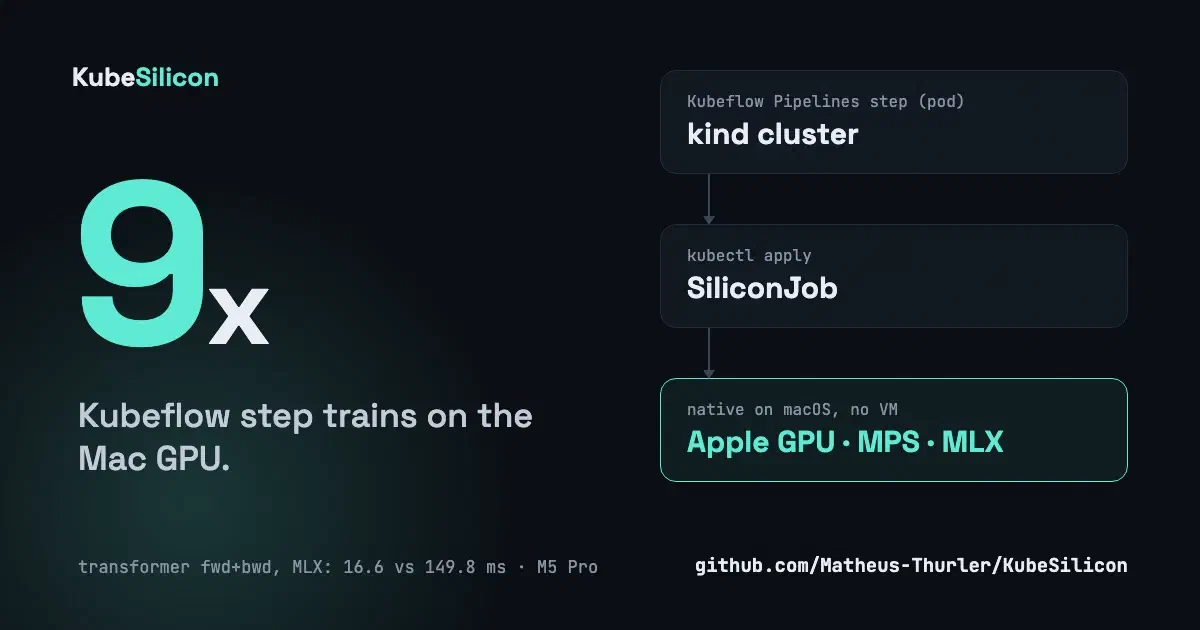
In the last post I built KubeSilicon to run Linux VMs on a Mac from Kubernetes objects. The obvious next question is: can the VM use the Mac GPU?
No. A Linux guest under Apple’s Virtualization.framework has no path to Metal. That is a platform limit, not a bug I can fix.
So I stopped trying to put the GPU inside the VM and moved the work to where the GPU is.
The idea: run it natively, ask for it from Kubernetes
A SiliconJob is a Kubernetes object. The daemon that already runs on the Mac watches for it, creates an isolated Python environment with uv, installs the dependencies, and runs the script on macOS with PyTorch MPS or MLX.
apiVersion: kubesilicon.io/v1
kind: SiliconJob
metadata: { name: mlx-matmul }
spec:
  dependencies: [mlx]
  script: |
    import mlx.core as mx
    print(mx.default_device())   # Device(gpu, 0)
Phase and the last 4 KiB of the log are copied into status, so kubectl get sjob -w works as you would expect. Inputs and outputs are plain HTTP URLs (presigned URLs work), and the job never sees credentials.
How Kubeflow sees it
It does not, and that is the point. There is no Kubeflow plugin. A pipeline step is a pod, the pod creates a SiliconJob through the Kubernetes API, and the daemon on the Mac reads the same API. The step waits and prints the job log.
KFP step (pod) ── creates SiliconJob ──► Kubernetes API ◄── watches ── kubesilicond (Mac)
      ▲                                                                     │
      └────────── status + log tail ◄───────────────────────────────────────┘
I tested this on kind with Kubeflow Pipelines 2.18 on Kubernetes 1.34 and 1.37.
A real pipeline
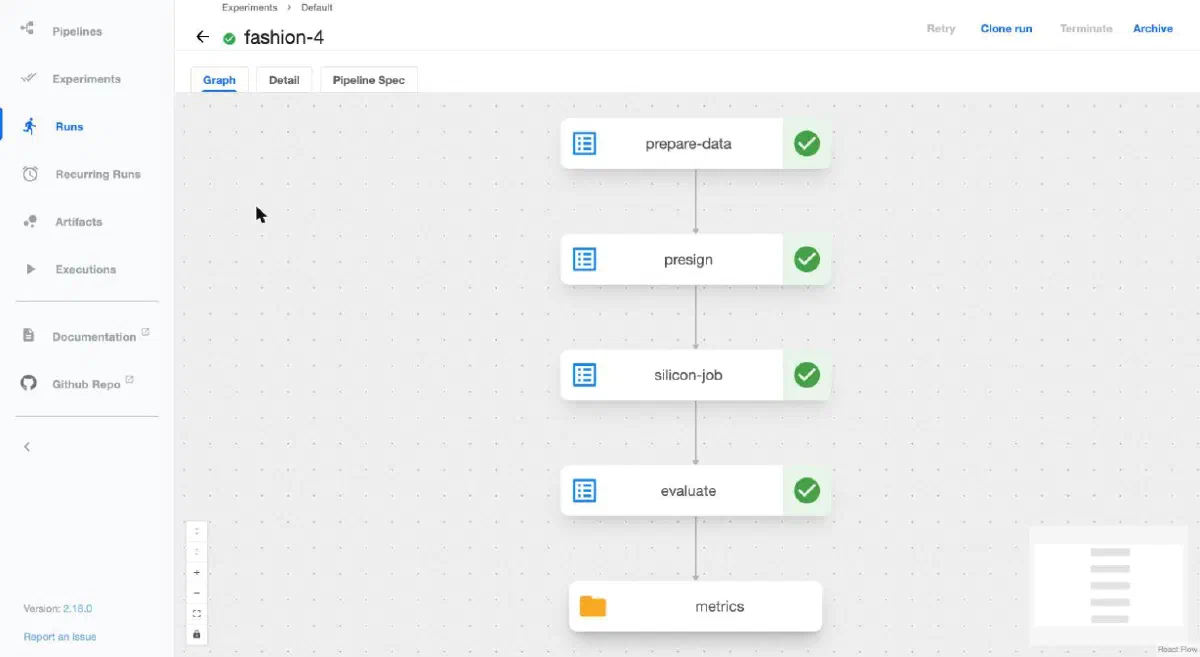
The example trains a small network on Fashion-MNIST in four steps:
- prepare_data (pod) downloads the dataset into the cluster’s S3 (SeaweedFS).
- presign (pod) creates presigned URLs so the Mac can read and write only those objects.
- silicon_job (Mac GPU) trains and returns the model through those URLs.
- evaluate (pod) loads the model on the CPU and reports the accuracy.
The run finished with device: mps and a test accuracy of 0.8645. The evaluation step, on a different machine and a different library, got the same number the training reported, so the artifacts made the trip intact.
After that I registered the model in Kubeflow Hub (the Model Registry) and served it with KServe. I asked the endpoint to classify 8 test images and it got 8 right. KServe runs in Standard mode, plain Deployments with no Knative or Istio, which fits a 12 GB kind cluster.
Is the GPU worth it?
I ran three benchmarks each for PyTorch (MPS) and MLX: 2 warmups, then the median of 5 runs, on an M5 Pro with the kind cluster running at the same time. Synthetic data, fp32.
PyTorch (MPS)
| Benchmark | GPU | CPU | Speedup |
|---|---|---|---|
| matmul 1024x1024 | 2.0 ms (1085 GFLOPS) | 1.2 ms (1826 GFLOPS) | 0.6x, CPU wins |
| matmul 2048x2048 | 3.4 ms (5081 GFLOPS) | 9.1 ms (1886 GFLOPS) | 2.7x |
| matmul 4096x4096 | 23.6 ms (5830 GFLOPS) | 79.3 ms (1733 GFLOPS) | 3.4x |
| ConvNet train step, batch 64, 3x32x32 | 8.7 ms (7344 img/s) | 67.7 ms (945 img/s) | 7.8x |
| Transformer, 4 layers, d=512, seq 128, batch 16, fwd+bwd | 41.5 ms (49.4k tok/s) | 182.1 ms (11.2k tok/s) | 4.4x |
MLX
| Benchmark | GPU | CPU | Speedup |
|---|---|---|---|
| matmul 1024x1024 | 1.0 ms (2051 GFLOPS) | 1.1 ms (1916 GFLOPS) | 1.1x |
| matmul 2048x2048 | 1.3 ms (13364 GFLOPS) | 8.5 ms (2016 GFLOPS) | 6.5x |
| matmul 4096x4096 | 8.1 ms (17001 GFLOPS) | 68.4 ms (2009 GFLOPS) | 8.4x |
| MLP train step, batch 512, 784-1024-1024-10 | 1.8 ms (284k samples/s) | 6.7 ms (76k samples/s) | 3.7x |
| Transformer, 4 layers, d=512, seq 128, batch 16, fwd+bwd | 16.6 ms (123k tok/s) | 149.8 ms (13.7k tok/s) | 9.0x |
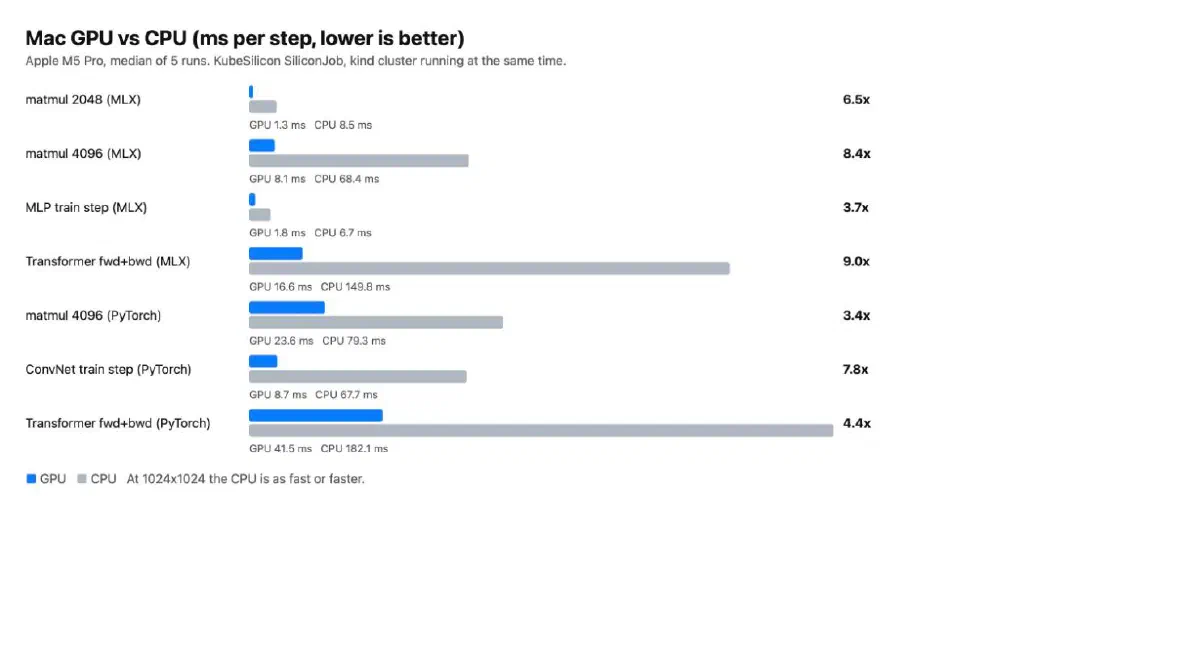
Three things I take from it. First, small work does not pay: at 1024x1024 the CPU is as fast or faster, because each GPU call has a fixed cost. Second, once the work is big enough the GPU wins by 3x to 9x. Third, do not read the MLX against PyTorch rows as “MLX is 3x faster”: the two transformer models are not identical, so only the matmul rows compare like for like. The full method and every number are in docs/benchmarks.md. Not measured: fp16, memory, power, and long runs with thermal throttling.
What I made it survive
Once it worked, I asked what happens when the Mac does what Macs do.
- Reboot. A job that is interrupted is retried up to
backoffLimittimes (default 2) and counted instatus.attempts. A script that exits with an error is not retried. I tested a real reboot: the daemon came back at login and a job that had already finished did not run again. - Permissions. The daemon can run with a ServiceAccount that only touches its own CRDs and the Services it publishes.
kubectl auth can-isays no to secrets, pods and nodes. - Stuck steps. The pipeline step gives up after 15 minutes if the daemon never picks the job up, and deletes the pending object.
- A bug the tests did not catch. After a restart the VM came back without network, because the NIC got a new random MAC and cloud-init had pinned the first one. The MAC is now stored with the VM.
What it is not
- Not a security boundary. Jobs run inside
sandbox-exec(writes only in the job directory, no reads of your home), but Apple deprecated it and the network stays open. Do not run code you do not trust. - One GPU job at a time. The rest wait as
Pending. There is no memory limit per job, because macOS has no cgroups. Update: v0.4 runs jobs in parallel with a memory limit per job, see the next post . - No GPU for the VMs. Still true.
- Katib is deprecated. I wanted hyperparameter search, but the Kubeflow docs now point to the
OptimizationJobof Kubeflow Trainer, which is alpha. I have not tried it yet. - Dashboard without login. My lab Dashboard has no authentication and no dark theme.
Try it
It builds from source, because the daemon needs the virtualization entitlement:
git clone https://github.com/Matheus-Thurler/KubeSilicon
cd KubeSilicon
make install CTX=kind-<your-cluster>
kubectl apply -f examples/mlx-matmul.yaml
The Kubeflow example is in examples/kubeflow/, and docs/production.md lists what survives a reboot and what does not. Releases are automatic now: commits follow Conventional Commits and release-please opens the release PR. The code is at github.com/Matheus-Thurler/KubeSilicon
.
kubectl get related
| NAME | READY | STATUS | AGE |
|---|---|---|---|
 parallel-gpu-jobs-mac-kubesilicon Running GPU jobs in parallel on one Mac: memory is the scheduler | 1/1 | Available | <1d |
 kubevirt-on-apple-silicon-kubesilicon KubeVirt does not run on Apple Silicon, so I built KubeSilicon | 1/1 | Available | 21d |
 virtfoundry-0-13-tenant-isolation Two tenants, one bridge: how we found and fixed a cross-tenant leak in VirtFoundry | 1/1 | Available | <1d |
kubectl get events